Fyrconthius Lazenquill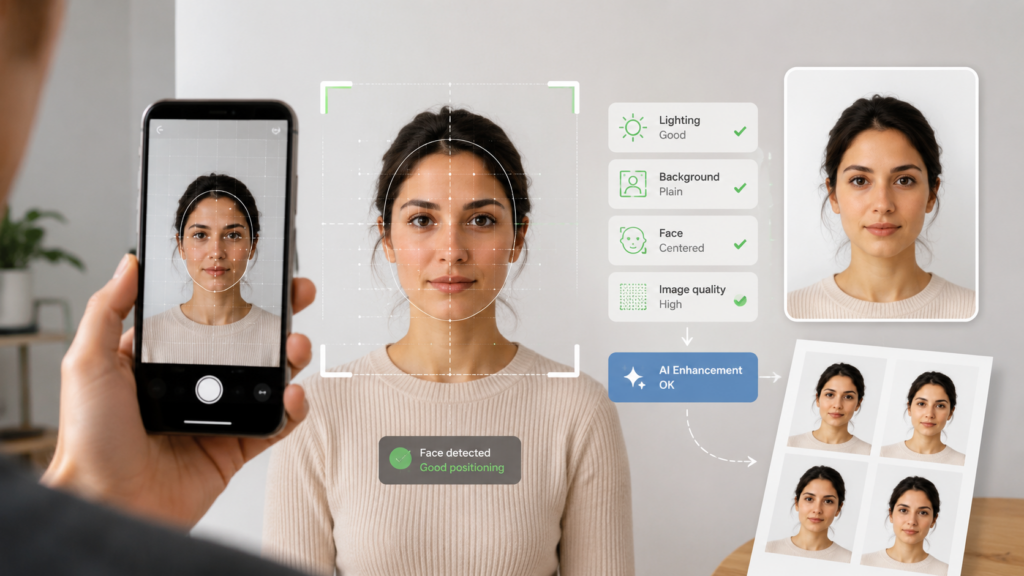
Passport photography does not seem like a technical challenge. You stand in front of a camera, look straight ahead, and take a picture. Simple.
Except it often is not.
A photo can look perfectly acceptable on a phone screen and still fall short of official passport or visa requirements. The crop may be slightly off, the head may take up too much of the frame, or a faint shadow may appear on the wall. An image that looks sharp enough for social media may also lack the clarity needed for an identity document.
That difference between “looks fine” and “meets the rules” is exactly what online passport photo tools are designed to address.
Instead of merely resizing an image, these passport photo tools can check the photograph against the specifications of a particular document. They may assess facial position, image dimensions, lighting, background quality, and overall sharpness before the user submits the final file.
Artificial intelligence increasingly supports this process, although its role is less dramatic than the label might suggest. It is not inventing a new face or transforming a casual selfie into a studio portrait. In most cases, it is doing something far more practical: measuring, checking, and identifying problems that are easy to miss.
Why Passport Photos Are So Easy to Get Wrong
There is no universal format for passport photos, which is where much of the confusion begins.
Requirements vary by country, document type, and submission method. A passport may need one set of dimensions, while a visa or residence permit requires another. Rules for background colour, image resolution, file size, and head position can also differ.
The variations may seem minor, but even a small mistake can make a photo unsuitable.
Someone taking a picture at home may follow the basic advice yet still miss the more technical details. The head might be too high in the frame, there may be too little space above the hair, or the camera may be positioned slightly below eye level.
What the Software Actually Checks
Most passport photo tools begin by locating the face.
The software estimates the position of features such as the eyes, chin, forehead, and sides of the head. It then uses those points to check whether the person is centred, facing forward, and taking up the correct amount of space in the image.
This is not necessarily facial recognition in the usual sense. The software is not trying to identify the person. It is measuring the shape and position of the face within the frame.
Once the face has been mapped, the photograph can be cropped and resized for the selected document. The same original image may need a different crop depending on whether it is being used for a passport, visa, driving licence, or identity card.
The software may also flag problems that are difficult to notice on a phone screen, including blur, weak contrast, uneven lighting, glare on glasses, facial shadows, or a distracting background.
Not every problem should be fixed automatically, however.
If the image is badly blurred, part of the face is covered, or the lighting significantly changes the person’s appearance, taking a new photo is usually the better option. A reliable tool should know when an image can be prepared safely and when it should simply be rejected.
The Background Is Often the Hardest Part
Taking a passport photo at home seems straightforward until you pay attention to what is happening behind you.
A pale wall may still have visible texture, marks, shadows, picture frames, or a corner running through the shot. Stand too close and you may create a dark outline around your head. Stand too far away and parts of the room can enter the frame.
Some online tools can isolate the person and replace the original setting with a plain background. That can be useful, but it does not mean the image should be edited without limits.
A passport photo is an identity record, not a profile picture. Accuracy matters more than appearance.
Beauty filters, skin smoothing, facial reshaping, artificial makeup, and similar effects may produce a more flattering image, but they can also make it less suitable for official use. The best starting point is a clear, evenly lit photograph that needs only minimal adjustment.
Why Choosing the Right Document Matters
The most valuable part of an online passport photo editor may not be the AI at all. It may be the database of document requirements behind it.
Users should be able to select both the country and the exact document they are applying for. The service can then use the appropriate dimensions, proportions, background rules, resolution, and file settings.
This matters because there is no universal “passport-size” photo.
Two images may look almost identical while following different official specifications. A photo prepared for one country may not be accepted by another, and a printed application may require a different format from an online submission.
Online passport photo maker such as PassportPhoto.Online allow users to select the relevant country and document before preparing the image. This helps ensure that the photograph is formatted according to the chosen application rather than a generic passport-photo template.
Choosing the correct template at the start is far safer than trying to estimate the crop and dimensions manually.
Taking a Better Photo From the Start
Even the best software has an easier job when the original photograph is already close to the required standard.
Soft, even lighting is usually preferable to direct flash or a strong ceiling light. Position the camera near eye level, face it directly, and leave enough room around the head and shoulders for the image to be cropped correctly.
It is also better to ask someone else to take the picture when possible. Holding a phone at arm’s length can distort facial proportions and make it difficult to keep the camera straight.
Avoid portrait mode, filters, screenshots, and compressed copies of the image. Uploading the original camera file preserves more detail and gives the software a better source to work with.
The setting does not need to resemble a professional studio. A plain, evenly lit background without visible objects is usually enough. Starting with a clean photograph is far more reliable than depending on extensive digital corrections later.
A Practical Use of AI
Passport photo software is not the most dramatic application of artificial intelligence, but it demonstrates where the technology can be genuinely useful.
It does not replace the passport authority or decide whether an application will be approved. Its role is more limited: interpret technical requirements, examine the photograph, and help prepare an image that is more likely to satisfy them.
That still solves a common problem.
Most people apply for identity documents only occasionally, so they are unlikely to remember detailed rules about dimensions, framing, resolution, and background quality. Turning those rules into straightforward checks can save time, reduce uncertainty, and prevent a simple photograph from delaying an otherwise complete application.
The most dependable tools are not those that make the greatest number of edits. They are the ones that know when to crop an image, when to flag a problem, and when the best advice is to take another photograph.
About The Author